

The entire team here at AirReps, which now includes the Control Products Group division, is dedicated to helping customers and partners with all of their HVAC needs, 24/7. That’s why when we had a customer reach out with an issue on their HVAC system with the VFD, we thought it might be pertinent to not only assist him with his issue, but also, to create a blog post that others could look to in order to rectify issues with their HVAC system as well.
The question that has prompted our blog post today is fairly simple, but incredibly important when it comes to ensuring that your VFD is running properly.
“Is there ever a time where the VFD status can say the pump is on, but the pump actually isn’t running? Whether from a burnt-out motor or any other reason. Will the VFD always recognize that the pump has failed?”
This truly is a great question, and the answer contains imperative information for anyone with a VFD as an integral part of their HVAC system.
To truly answer this question, we must go back to before the VFD even existed. Back in the old days, long before VFDs, customers would sometimes rely on Current Sensing Relays, often referred to as CSRs, in order to verify that amps were actually flowing through the motor wires. The CSR status gave us an indication that the motor was pulling amps and likely rotating, and to this day, many savvy users still add these CSRs to VFDs to show status.
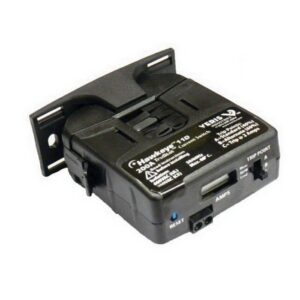
However, while in many cases helpful, these CSRs do need some adjustment. To ensure proper operation, you want them to go high when the motor is pulling a real load, and not necessarily show a run status in the event that the motor throws the belt or is otherwise operating under no-load conditions. The little screw pots inside the device can be finnicky, and they come in different sizes depending on amps that you need to read.
Which leads to the question, can we just use the VFD programmable relay outputs to tell us the same thing? The answer is MAYBE, but there are several options that depend on your specific sequence.
Below is a summary of the options, however, there are many, and I’m sure as soon as this article has been published, I will likely think of more options!
Option 1: This option to check the VFD on an HVAC system is typically default from the factory. Set one of the relay outputs 5-40 to “[5] Running”. This tells you that the drive has a start signal and is trying to run the motor.
Advantage: This is easy and it’s the default setting on most drives. This application is very user friendly, as it’s easy for many to understand, and best of all, it usually works. If a motor phase was lost or if the system had experienced a ground fault the VFD, the system would trip, and the status would drop.
Disadvantage: In this application, there is no guarantee that any motor is connected, just that we are asking the VFD to run and it thinks it is running. That is, if the motor throws the belts or is physically disconnected, you wouldn’t necessarily know.
Option 2: Set relay output 5-40 to “[6] Running/no warning”. This version is a slightly more advanced variety of option 1, as it just adds the information that we don’t currently have any VFD warnings, such as high temp or current warnings.
Option 3: Set relay output 5-40 to “[8] run on reference/no warning”. Even more information here, now the VFD has reached the commanded speed with no warnings. If the speed is within 5% of the setpoint then the relay goes high.
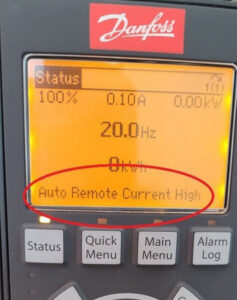
Option 4: Set relay output 5-40 to “[14] above current, high”. Then adjust 4-51 to a current value that is slightly below the current at minimum speed.
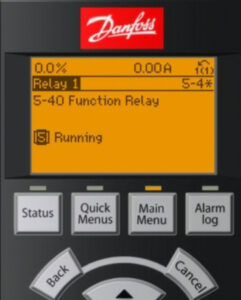
Advantages: This is now an electronic version of the current sensing relay, the VFD relay will only show a status when the current goes above the typical draw that you see above the motor minimum speed. The motor is probably working and turning a load here.
Disadvantages: The display will read “current high,” which might put some owners on high alert if done unexpectedly. It doesn’t actually show as a warning, rather a message on the bottom of the display.
Option 5: Utilize options one, two, or three, and in addition to those functions, add programing the “broken belt detection” sequence that is built into the VFD. This will give you a “broken belt” warning, or trip if the amps are below a preset limit when the drive is running.
Option 6: If you have completed any of the above options and read the actual motor current value over BACnet, then it will show up as AV5 and reads in amps. If the motor has amps and there are no other alarms reading, that is probably the best that can be done to see if the motor is doing work here.
An important note to consider – on VFDs with bypass, if you are running in bypass due to a (hopefully) very rare failure in the VFD – how do we get the motor status? Since this is a rare and temporary emergency operating condition, you may not necessarily need a motor status here. If you manually switched it into that condition, and it is running full speed – if you really need a motor status here at the EMCS – you will probably need a CSR to tell you if the motor is spinning.

As always, this blog post is meant to be helpful in operating your HVAC system, but this guide is not the end all be all in addressing issues with accessing your VFD. If you’re still having issues, or you’re not quite sure if your system is running properly, give our team a call. Whether you need a quick fix or it’s time to upgrade your entire system, someone on our team here at AirReps can assist!